Kamis, 27 Agustus 2009

NewsGate

The NewsDepot Internet Access Server

The NewsGate System is a gateway for the outside world (reporters) to the LAN back in the main studio. It is used by reporters who are not based near their central studio but who may be on the other end of the world, and who want to upload their “hot” news back to the studio even in the middle of the night. The news item is recorded on any type of audio equipment connected to the reporter’s PC/notebook that has an Internet connection.

The NewsGate at the Broadcast house is connected to the web and offers a low-cost tool for the reporter abroad to upload his/her item to the studio.The reporter that's abroad does not need to buy or install extra software or hardware on his/her PC or notebook. He/she only needs the studio's website address (URL) in order to upload the item.

In general the NewsGate system at the studio will have a connection onto the network where a NewsDepot is installed. The NewsDepot will then collect the uploaded items from the NewsGate and forward these items onto the BAS system.

The NewsGate Server allows the transfer of audio files in various formats through the Internet without the need for any specific soft- or hardware module.

The Internet Upload
With the internet upload function the user will select the website address (URL) of the broadcast house in his personal web browser.

A welcome page will be displayed, providing some information to the user. After clicking the “Login” hyperlink the user can log in to NewsGate. If he/she has does not have a login account yet, the user can request one by clicking a hyperlink which provides email access to the system administrator.

After successful login the upload form will be presented to the user. This form contains the following fields:

  • Filename
  • Title
  • Location
  • Author (not shown in picture below)
  • Destination (drop down box)
  • Comments
  • Each of the fields can be set to mandatory.

    The user can browse his/her local system to insert the file to be uploaded. The data can be entered in the
    data fields, and clicking the “Send” button will start the upload.


    NewsGate can contain multiple directories to ensure an easy overview and access of the news that is uploaded onto the NewsGate by the external reporters. Each destination is a separate folder and the items in each folder can be processed differently. Users can then create destinations such as “Pictures”, “Movies”, “Text”, “Audio” or “Sports” and “Current Affairs” as needed. Items uploaded to the “Movies” destination are forwarded to a video processing system and the item uploaded to “Sports” are forwarded to the “Sports” Category of the radio automation system.

    During the upload the user is informed continuously about the progress and the estimated remaining time.


    After the upload a result window appears summarizing the details of the upload. This lets the user know his/her file has been uploaded successfully. If the user wants to know whether the file has been processed correctly and inserted into the broadcast automation system, he/she needs to view his/her (personal) log file, by clicking the corresponding hyperlink. File processing may take several minutes.

  • The log file window shows all items that have been uploaded to the system, with
    date/time, filename and title and the upload status.
    The upload status can have three states, each supported by a colour:

  • Error (Red), this means the upload was not successful.
  • Upload OK (Yellow), the upload was successful, but the file has not
    yet been processed and inserted into the broadcast automation
    system.

    In database (Green), the file has successfully been inserted into the broadcast automation system
    and will be available to all users.


  • System administration

    A web based administration system allows the system administrator to configure the system from any location in the local area network.

    The possibilities are:


    User interface customization
    Here the administrator can configure the appearance of the web pages. He can define the logo, the fore- and background colours, change all user-definable texts and define the language of the system (currently supported languages are German and English). Further, each of the upload fields can be assigned a user-defined label.

    Database access
    Access to the system internal database offers the possibility to view, add, modify and delete database tables containing users and destinations.

    Log files
    All log files can be viewed, downloaded and cleared. The system keeps three types of log files:
    1) Login log, an overview of all attempts to log in to the system.
    2) Upload log, an overview of all attempts to upload a file.
    3) Admin log, an overview of all attempts to login as administrator.

    Server settings
    Capability to change server settings such as IP addresses for LAN, Internet and Gateway. Specify a blacklist for files that cannot be uploaded (such as *.exe, *.com *.dll) and define how long files, that are not fetched must remain on the system.
    The “Systems Statistics” window shows system information, such as used disk space.

    Settings for alert functions allow (in combination with the Arbor alerter module) the system to automatically send emails or provide other acoustic or visible alerts upon definable events.

    System Control
    The system can be shut down or restarted.


    Browser compatibility
    The NewsGate system is an open system that is theoretically accessible with any Internet browser. There are however, many browsers available on the World Wide Web and the compatibility between them is not self-evident. The NewsGate system is tested with the following browser versions:

    PC Platform:
    Microsoft Internet Explorer V5.0 and V6.0
    Netscape Navigator V4.7 and V6.1
    Opera V5.10

    Mac Platform:
    Microsoft Internet Explorer V5.0
    Netscape Navigator V4.08

    All above-mentioned browsers will work with NewsGate, although there may still be differences in the make-up and sometimes behaviour of the pages.

    Features

  • Integrated Web Server with WebClient application
  • Integrated firewall
  • Dedicated Linux based system
  • Easy access with just an internet connection
  • No local software required
  • Robust 19" case with optional redundancy
  • Upload for Audio, Video. Text and Pictures
  • Optional direct dial-in connection for urgent contribution
  • Web-based management
  • Supports FTP access as well
  • Multiple destinations
  • User definable texts, pictures (logo) and appearance


  • Web-based management
    The NewsGate system can now be managed from anywhere in the network. With the web based management you can view and set all system parameters. This includes creating users and destinations, and also modifying the graphical interface or changing the IP-address.

    You don't even have to leave your seat for a reboot or shutdown.

    http://www.arbor-audio.com

    AVEX Installations


    AVEX Installations covers Northern Texas. They have 5 Wildblue installer certified techs and 7 Direcway installer certified techs (this include the 5 WildBlue installer techs). In the business for 12 years (as of 2005). They also have experience in Home Theater, Plasma TV Installations, Video Projection systems, Home Security, CCTV, Networking, (currently have a contract with 41 Wal-Mart stores through NetTech), VSAT systems, FTA systems, Dishnetwork, DTV
    VOOM, (until they went out of business). They are going to focus on fiber optics and gaining more VSAT certifications this year.
    Contact details: If you need VSAT or Wildblue installation call John Lowry on 918-812-4551 or email dishlowry@yahoo.com.

    http://www.satsig.net/satellite-internet/satellite-internet-texas.htm

    iDirect NetModem II Plus


    Technical Specifications
    Configuration, Status, and Commissioning:
    Uses HNS Vision Network Management System
    SNMP management of appliance
    Satellite download of configuration and software
    Serial Protocols:
    Synchronous: Two RS-232 synchronous/asynchronous serial ports (DB-25F)
    Asynchronous: Two RS-232 asynchronous serial ports (DB-9F)
    Ethenrnet: One 10/100BaseT Ethernet LAN RJ45 port
    Data Rate Specifications (Serial Data Rates):
    Synchronous: 1,200 - 64,000 (bps)
    Asynchronous: 1,200 - 56,000 (bps)
    Input Power:
    Ku-band: 1.0 and 2.0 Watt
    Mechanical & Environmental:
    Shipping Weight: 5.3 lbs (2.4 kg)
    Unit Weight: 2.2 lbs (1 kg)
    Dimensions: 1.8 W x 9.5 H x 10.5 D (inches)
    4.6 W x 24.1 H x 26.7 D (cm)
    Operating Temperature: 41–104° F
    5–40° C
    Input Power: 100–240 V ~ 1A max
    50–60 Hz
    15 W typical

    www.highspeedsat.com/hn9000.php

    iDirect NetModem II Plus Superior Satellite Internet

    Superior Satellite Internet Technology is Built In

    click to see the details of modem panels

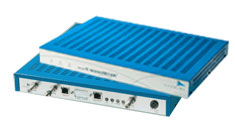
    Netmodem II+ front and back panel

    The iDirect NetModem II Plus Broadband Router is a compact, set-top terminal that routes IP traffic over satellite networks. This highly advanced Enterprise Class solution integrates all the hardware and software needed to deliver bidirectional broadband connectivity, easily and efficiently, while enabling the highest data rates available in the industry today with throughput speeds of up to 9.1 Mbps. Better still, the NetModem II Plus is highly scalable for both inbound and outbound data rates, which allows users to easily accommodate current and future bandwidth requirements.

    In addition to industry-leading technologies including TDMA, Turbo Product Code, and TCP Acceleration, the NetModem II Plus offers unique capabilities that optimize IP application performance through highly efficient bandwidth usage, greater flexibility, and enhanced reliability.

    iDirect Technologies' unparalleled Real Time Traffic Management (RTTM) features enable mission-critical information to reach the desired destination quickly and efficiently. iDirect RTTM features include:

    • Application QoS
    • Group QoS
    • Segmentation & Reassembly
    • Committed Information Rate
    • Feathering Timeslot Allocation
    • Compressed RTP (cRTP)

    iDirect Broadband Satellite Access Network

    The iDirect Technologies hub and remote hardware and software equipment provides connectivity for IP based services such as data, voice and internet connectivity. This Very Small Aperture Terminal (VSAT) network can provide data at speeds from 64 kbps to 4.2 Mbps from the remote site and up to 9 Mbps from the hub to the remotes. Each iDirect remote terminal includes a built-in router and is packaged with features such as link encryption, Transmission Control Protocol (TCP) acceleration, Domain Name Server (DNS) caching and Quality of Service (QoS) prioritisation all in one box.

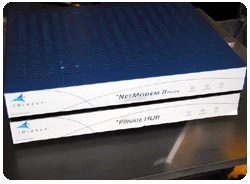
    idirect satellite Internet modem and a hub

    The iDirect system makes use of a number of inventions (patents applied for) covering their software and hardware components. These patent applications are for proprietary methods, apparatus and systems that impact such aspects as the allocation of bandwidth, quality of service, and network management/optimisation of iDirect's overall Internet Protocol (IP)-based broadband satellite technology. The proprietary technology contained in these patent applications offers iDirect customers real benefits by allowing them to better utilize their bandwidth and provide a quality of service level that is unsurpassed in the industry. The capacity and control provided by the iDirect IP over satellite technology is allowing the customers to provide services like Voice over IP and video conferencing faster, easier, and more profitably all over the world."

    Mobile Satellite Internet Solution with iDirect

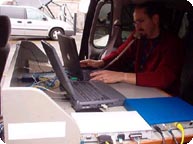
    The iNetVu Mobile Satellite Internet Platform has been adapted work seamlessly with iDirect Technologies NetModem II products. iDirect Technologies designs, develops, and markets the fastest, most reliable bi-directional satellite-based broadband access solutions using Internet protocols. iNetVu Mobile satellite platform when coupled with the iDirect NetModem II is capable of delivering Internet access, video and VoIP into vehicles, while stationary, at speeds of up to 18Mbps on the download and 4.2Mbps upstream anywhere in the world where one has access to satellite connectivity.

    click to see the details of modem panels

    VoIP over iDirect and iNetVu
    mobile satellite platform

    We are able to offer the iNetVu Mobile self pointing antenna solution to iDirect customers world wide. The combined solution provides customers the ability to automatically locate their satellite of choice from a vehicle or moveable structure anywhere in the world in under 3 minutes by a simple click of the mouse and be instantly connected to the Internet at broadband speeds.

    The iNetVu Mobile systems configured with iDirect modems have been already delivered to Government Agencies, Film Production companies, Oil and Gas Exploration and other resource based companies as well as to Fire Fighting Teams and Utility companies world wide.

    www.highspeedsat.com/hn9000.php

    Hughes R-BGAN Satellite Modem


    Technical Specifications
    User Requirements - The DIRECWAY system connects to your personal computer (PC) which must meet the following minimum requirements:
    Processor: 333 MHz Pentium II class or better
    Interface: One available USB port
    Operating Systems: Windows 98 SE, Windows ME, Windows 2000
    Memory: 64 MB RAM (Win 98 SE and Win ME)
    128 MB RAM (Windows 2000)
    Free Hard Disk Space: 20 MB
    Display: PCI or AGP video adapter, 800 x 600 minimum
    Compatibility:
    Browsers: Internet Explorer 5.0 or higher
    Netscape Navigator 4.76
    Internet Application: All common TCP/IP applications, UDP or RTP traffic
    Interface: USB 1.1 or higher
    Mechanical & Environmental:
    ITU Weight: 1.3 LBS
    IRU Weight: 1.35 LBS
    IRU Power Supply Weight: 0.64 LBS
    ITU/IRU Dimensions: 6.03" x 1.50"H x 9.0"D
    Operating Temperature: 5 - 40° C
    Input Power (IRU/ITU): Input- 100-240V - 2A, 50-60Hz AC
    Output - 19.5V DC @ 2.37A
    6.5V DC @ 1.3A

    HN9000 Satellite Modem

    Technical Specifications
    Satellite & Antenna Specifications:
    Outbound transm. format: DVB-S or DVB-S2
    DVB-S2 supports adaptive coding and modulation
    Information Rate (Receive): Up to 121 Mbps
    Information Rate (Transmit): Up to 3.2 Mbps
    Symbol Rate (Receive): 1 to 45 Msps (in 1 Msps steps)
    Symbol Rate (Transmit): 128, 256, 512, 1024 ksps
    Encoding DVB-S (Receive): Convolutional with concat. Reed Solomon;
    Viterbi 7/8, 5/6, 3/4, 2/3, 1/2
    Encoding DVB-S2 (Receive): BCH with LDPC 3/5, 2/3, 3/4, 5/6, 8/9, or 9/10 (8PSK)
    1/2, 3/5, 2/3, 4/5, 5/6, 8/9, 9/10 (QPSK)
    Transmit encoding: Rate 1/2, 2/3, 4/5 TurboCode,
    Rate 1/2 Convolutional
    Frequency Range: C-, extended C-, Ku-, and Ka-band
    Modulation (Receive): QPSK or 8PSK
    Modulation (Transmit): OQPSK
    Bit Error Rate (Receive): 10-10 or better
    Bit Error Rate (Transmit): 10-7 or better
    Radio: 1 and 2 watt Ku-band
    2 watt C-band
    1, 2, and 31/2 watt Ka-band
    Physical Interfaces:
    Ethernet: Two 10/100BaseT Ethernet LAN RJ45 ports
    Serial: One Serial port (RS-422 or RS-232)
    Mechanical & Environmental:
    Weight (IDU): 2.18 kg (4.8 lbs)
    Dimensions: 11.5" W x 1.8" H x 11" D
    (29.21 cm W x 4.7 cm H x 27.94 cm D)
    Operating Temperature (IDU): +32º F (0º C) to +104º F (+40º C)
    Operating Temperature (ODU): -22º F (-30º C) to +131º F (+55º C)
    Input power: 90 to 264 VAC; 50 to 60 Hz
    DC power supply (optional): 12 to 24 VDC


    www.highspeedsat.com/hn9000.php

    Senin, 24 Agustus 2009

    Modem Nokia 6120c

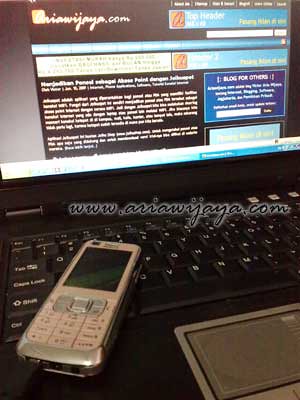
    Back to the phone modem .... After getting a new Ransom (pinjeman new phone), now I want to inform you use your Nokia 6120c as a modem, all to answer some temen asking about using this phone as a modem. For additional information, your Nokia 6120c is supported 3.5G connection.
    Like last writings on the Nokia phone modem (3110c, 3500c, N82, 6270, E61, and N70), for Nokia 6120c this time I still use the Nokia PC Suite version 7.1 as the main weapon for internet connection, supported by the data cable DKE -2. As for the card, I still use the T-Sel Flash Unlimited.

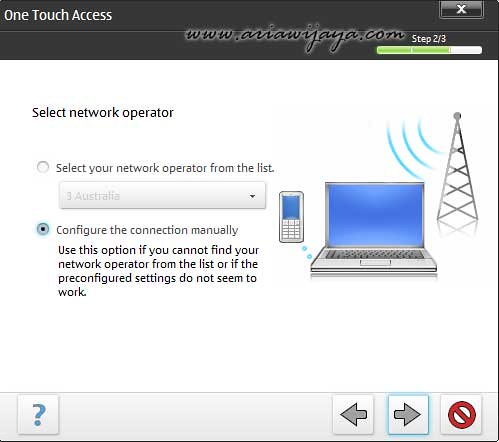
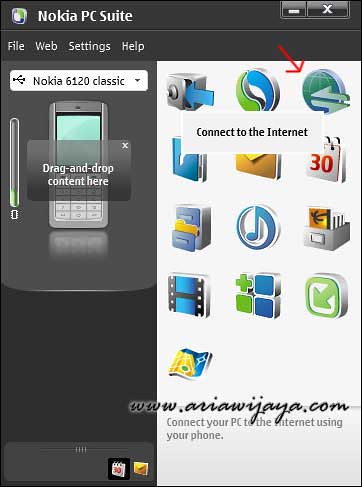
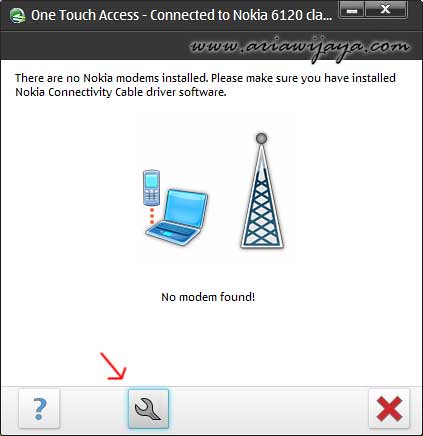
    I actually the same as the previous information about this nokia phone modem, after all ready (the PC Suite software installed and the phone has been connected to the laptop / PC) we run the Nokia PC Suite, and select the icon "Connect to the Internet to run the wizard One Touch Access. After logging in One Touch Access pane, select the icon setting to setup an internet connection.

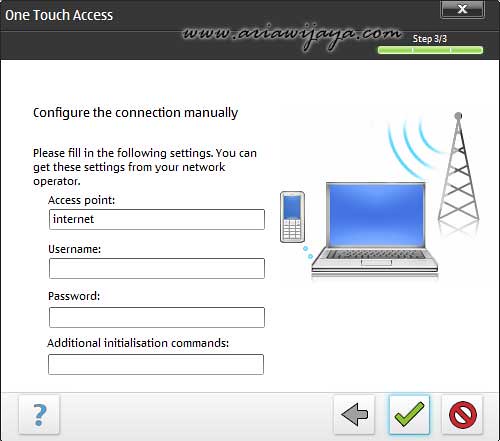
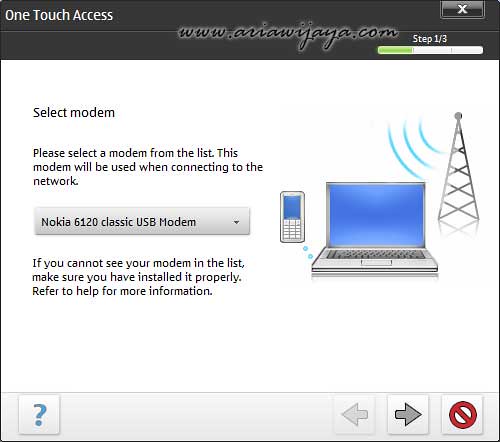
    Next we select the modem that we use (modem Nokia 6120c), and for the Network Configuration Operators manually plih (Configure the connection manually).

    Since we are using manual configuration, so for example here, I input the parameters of the T-Sel Flash Unlimited (APN: internet username and password: blank). To other GSM operators, please see the article about the Internet connection parameters.

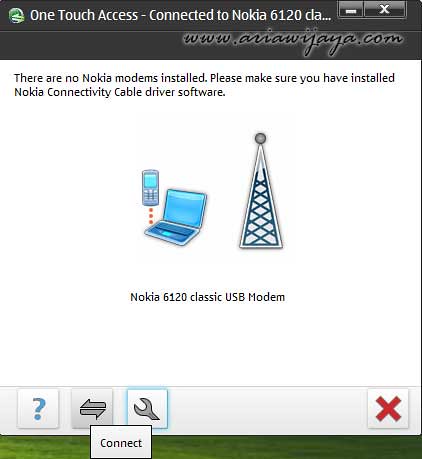
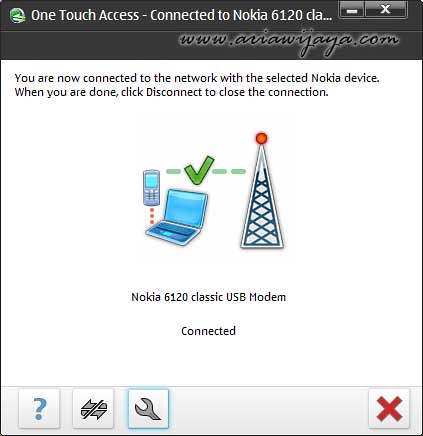
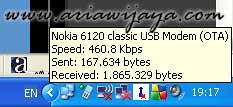
    At this point the connection setup process is complete, and we are biased to try to connect through the One Touch Access panel by pressing the Connect icon, if the connection is successful will be shown in the panel's One Touch Access, and if you mouse over the bottom right corner of the monitor (system tray) , will appear notification connection.

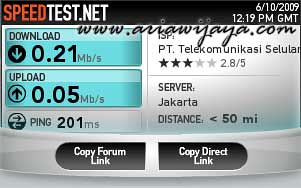
    To see the capabilities of this phone, I use Speedtest.net as a reference, and the test results appear biased downloading capabilities achieved is 0.21 Mbps (210 Kbps), and the ability to upload 0.05 Mbps (50 Kbps).

    Thing to remember here is that the connection speed depends on the condition of the operator's network that is used in place of our online, so in other places different bias the results.

    This brief information so I have to say, may be useful. Good luck.

    http://ariawijaya.com/2009/07/01/modem-nokia-6120c/