Tampilkan postingan dengan label WWAN. Tampilkan semua postingan

Rabu, 16 September 2009

3x 3G modems

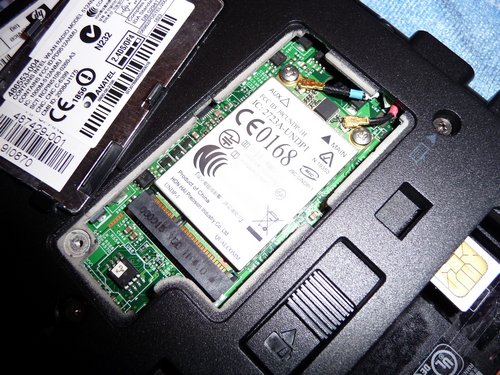
I recently bought a new notebook (HP 6930p) and made sure it also comes with extra antennas (next to the WLAN antennas on top of the display) so that I could install a Wireless Wide Area Network (WWAN, pictured below) adapter which I had to buy separately.
P1030684
HP un2400 wwan adapter on the HP 6930p

The good part about this wwan adapter – an HP un2400, also known as Qualcomm Gobi 1000 – is that it supports different frequency bands so it can work in many different parts of the world. This, however, and maybe that it is hidden under a cover inside this computer so you don’t have to carry extra gadgets, is the only good part about this modem.

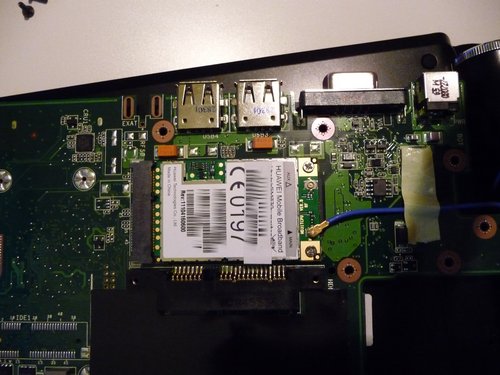
My other computer is a netbook which also has a wwan modem – an Asus eeePC 1000HG. Just slip in your SIM card (underneath the battery), boot into WindowsXP or Ubuntu and you’re ready to go online, simple as that.
P1010641
HUAWEI EM770 Mobile Broadband modem on the eeePC 1000HG

The HP un2400 modem on my HP notebook, though, will ONLY work when the (main) battery is inserted. HP names “carrier certifications” as the reasons for this requirement as:

  • This prevents SIM fraud
  • This prevents any possible corruption if the SIM is removed while the notebook PC powers on

Yeah…right.

Just to remind you: the 3g modem on my Asus eeePC will work either way – whether the battery is inserted or not, it just works.

And then there’s this thing called “Firmware” – which also is a very peculiar process on the HP modem. Whereas most gadgets will normally come with their own (preloaded) Firmware (which may or may not be updated by end users), this Qualcomm Gobi modem requires an initial load of the firmware prior to its use (HP’s Connection Manager will take care of this under Windows XP). Once you restart your computer, you will have to reload the firmware. The only possible reason for this – to my understanding – is that it enables the modem to adjust to different wwan environments. But that’s about it. Needless to mention that you won’t find any drivers for this device for Win7, and I’ve only come across a few users who managed to get this device working under Ubuntu after lots of fiddling.

And again, no problems with my netbook & its Huawei EM770 3g modem. Real plug & play, regardless of the operating system.

“So where’s the problem?”, you may ask, “aren’t laptops/notebooks and netbooks designed to be run from battery power anyways?” – Well, yes, BUT! I always remove the battery on my notebook when I’m about to connect it to a stable power supply for a longer period. Like when I plug it into the docking station at home, I always remove the battery. I do this to save it from being constantly charged. It’s a precaution that helps me keeping the battery at ~90% initial charging capacity after three years usage (as seen on my old HP nx8220 notebook). It’s a proven method that worked for me and saved me from spending another EUR 80,- on a spare battery.

And the worst part about this wwan adapter is that HP locked the BIOS to _ONLY_ use these modems. It wouldn’t be possible to use the 3G modem from the eeePC on the HP notebook.

Now, this is the part where I actually want to talk about alternatives to these internal solutions, which are often still considered to be the optimal solution. As described above, it’s a not-so-perfect solution for those who want to use other operating systems then Windows XP and/or Vista. It’s an epic fail that HP still needs to realize. And epic fail on all of their “EliteBooks” as HP calls this series (HP 2530p, 6930p, 8530p).

The eeePC I have is also available without such a 3g modem – the price difference used to be EUR 100,- less. People (not me, I got it cheaper :-) actually paid this difference in order to get a netbook with an internal 3g modem. As for the eeePC, the price difference is (was) justified as you had to cough up about the same amount for an external modem some time ago.

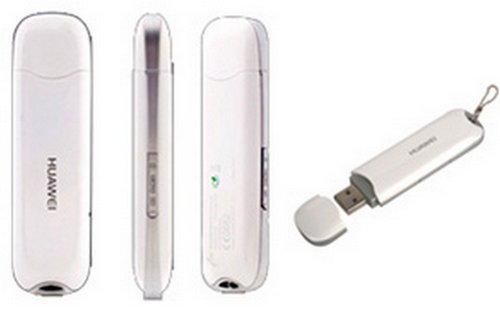
However, now, in September 2009, things are a bit different. Be it Germany or Kenya, you’re actually able to get an external USB-based 3g modem for something like EUR 20,- to 30,- – which is a decent price, I’d say. Sure, you could even get it for less (in Germany) if you go for a 24month contract with a network provider but I am only talking about prepaid solutions here.
E169
the popular Huawei E169

And these USB sticks are the very reason for blogging all this. I think that these external 3g modems are still the best solution for the following reasons:

  • they are supported by different operating systems & often well documented on the internet
  • they often come with their own software so you won’t have to worry about that part
  • power consumption on these devices is moderate, also because they are easier to remove (and wouldn’t require a software switch on the OS) – just unplug them
  • some of these sticks come with an extra socket for an external (UMTS) antenna
  • some of these sticks come with an extra flash memory capacity
  • they are relatively cheap these days
  • they can be used on more than one computer – just unplug them and hand them over to your friends (provided you have an unlimited data plan)

The disadvantage of course is that you’d have an extra device at the side of your notebook which blocks one of the often limited USB ports.

In the past I’ve also used thethering my Nokia phone to the computer and using its 3G capabilities to surf the net; and on my old & beloved (and now sold) HP nx8220 notebook I had used a PCMCIA (PC-Card) version of these 3G modems which I blogged about earlier. The PCMCIA version worked fine, albeit the PCMCIA port being known for quickly draining the battery (which also became obvious as it heated up pretty quickly). My new HP notebook has an ExpressCard slot, so this could also be an alternative if USB ports are really limited and already used for other devices.

To be honest, with this limitation of the internal 3G modem on my HP 6930p to Windows XP & Vista (and probably also Win7 one day), I’d probably go for another machine in future. I actually don’t know about the 3G modems on a Dell E6400 or Lenovo T400(s) – all of them seem to come with a Gobi device these days -, but I hope they aren’t as crippled as this Qualcomm Gobi? HP uses on their EliteBooks.? And signal strength (RX/TX ratio) actually isn’t so much better with the internal antennas which have to compete with the WLAN antennas for the limited space above the display. However, I understand that it isn’t the modem which sucks (some websites claim it even comes with an internal GPS chip?!) but rather HP’s policy which prevents us from using alternative operating systems and even locks the system down to this device only.

And with my policy of drawing a clear line between user data and the operating system + hardware, the external USB modem is just so much more convenient. It’s a plug & play device that adds modularity & flexibility to the system.

http://kikuyumoja.com/2009/09/01/3x-3g-modems/

Jumat, 21 Agustus 2009

Netgear intros two new home routers, one 3G WWAN router


Netgear's dropping a bunch of new kit here at CES, so we'll get right to the networking piece here. First up is the RangeMax Dual Band Wireless-N modem / router (DGND3300), which integrates an ADSL2+ modem with a 2.4GHz and 5GHz wireless router. Following that is the RangeMax Dual Band Wireless-N Gigabit Router (WNDR3700), which is the first product to introduce the outfit's fifth-generation industrial design. It's also packin' 2.4GHz / 5GHz support along with an inbuilt USB port for hooking up a wireless printer. Finally, the 3G Mobile Broadband Wireless Router (MBR624GU) does exactly what it says, which is to create a WiFi hotspot by plugging in a USB 3G modem. No prices are mentioned for any of these, but they should be in stores here shortly.


SOLUTIONS FOR THE HOME

Routers and Gateways
At CES, NETGEAR will debut three sleek, versatile, feature-rich wireless routers to fulfill the unique
lifestyle needs of different customer segments - for people on-the-go as well as consumers and
prosumers looking to upgrade their network environments and take full advantage of a growing number
of bandwidth-hungry applications, online gaming, and HD video streaming. Also in 2009, in partnership
with OpenDNS®, NETGEAR will introduce a powerful network-based parental controls service for select
Wireless-N routers and gateways, to enable parents to restrict access to unsafe web sites, filter
inappropriate content, and establish time limits around the use of the Internet. (See press release,
"NETGEAR Launches New Series of Versatile Wireless Routers Designed to Meet Needs of Prosumers,
Media Enthusiasts and People On-The-Go.") More information can be found at
(http://www.netgear.com/Products/RoutersandGateways.aspx?for=Home+Networking).

Named "Best of Innovations" in the CES Home Networking category, NETGEAR's RangeMax Dual
Band Wireless-N Gigabit Router (WNDR3700), the first product to introduce NETGEAR's sleek new
fifth generation industrial design, is a simultaneous Dual Band 2.4 GHz and 5GHz wireless router with
Gigabit ports and a USB port to network an external USB storage device for high speed data access from
multiple computers in the network. It incorporates a powerful 680 MHz MIPS processor, high
performance power amplifiers and eight ultra sensitive metamaterial antennas – resulting in faster wired
to wireless throughput and long range wireless coverage. Features include a four-port Ethernet low power
consumption "green" switch, dedicated Quality of Service (QOS) for video streaming over wireless, one-

touch wireless on-off and power on-off buttons, and adjustable transmit power for maximum energy
efficiency. Along with easy and secure Push 'N' Connect with industry standard WiFi Protected Setup
(WPS), the RangeMax Dual Band Wireless-N Gigabit Router is the ideal solution for the prosumer with
multiple networked gadgets running multiple applications, online gamers, and video streamers that
require the ultimate network experience.

NETGEAR's RangeMax Dual Band Wireless-N Modem Router (DGND3300) integrates an ADSL2+
modem along with a Dual Band Wireless Router operating at both 2.4 GHz and 5 GHz – all in
NETGEAR's popular compact industrial design. NETGEAR's modem router uses double firewall
protection including Network Address Translation (NAT), hiding PCs and files from outside users, and a
Stateful Packet Inspection (SPI) firewall denying outside requests for personal information. The Dual
Band Wireless-N Modem Router can also be configured as a wireless repeater to double the range. With a
new multi-language installation wizard, Push 'N' Connect with WPS, and energy saving features, the
modem router is perfect for DSL customers who want a single integrated wireless router and DSL modem
device for all of their growing networking needs.

And for consumers and professionals on-the-go, NETGEAR's 3G Mobile Broadband Wireless Router
(MBR624GU) creates an instant WiFi hotspot using 3G mobile broadband access service for broadband
access virtually anywhere, simply by plugging in any compatible 3G USB modem to the router. Mobile
users thus have the flexibility to create a WiFi network whether in a satellite or temporary office,
construction site, emergency center, hotel, vacation home, at an offsite event or campsite, or even from a
moving recreational vehicle. The 3G Mobile Broadband Wireless Router features auto detection of
compatible 3G USB modems and associated mobile carrier networks to have broadband access almost
instantly. It supports SPI, intrusion logging and reporting, denial-of-service (DoS) protection, up to five
IPsec VPN endpoints, and NAT. With Push 'N' Connect with WPS, energy saving features, and an
optional car power adapter to power the router while on the move, NETGEAR's 3G Mobile Broadband
Wireless Router is ideal for sharing a 3G broadband Internet connection with friends, colleagues

http://www.engadget.com/2009/01/07/netgear-intros-two-new-home-routers-one-3g-wwan-router/

Rabu, 19 Agustus 2009

ZTE Achieves XOHM Certification for WiMAX Modem

DALLAS--(BUSINESS WIRE)--ZTE USA, a subsidiary of ZTE Corporation, a leading global telecommunications equipment and network solutions provider, today announced that Sprints XOHMTM WiMAX business unit has certified its TU25 USB modem after extensive evaluation in the XOHM Herndon, Va. lab environment. The USB modem is the first certified for use with XOHMs Mobile WiMAX service, the companys next-generation broadband service now commercially available in Baltimore and planned elsewhere.

WiMAX (Worldwide Interoperability for Microwave Access) is a wireless internet technology designed to provide broadband connections over large areas - even in challenging city environments. ZTEs TU25 USB Modem provides XOHMs subscribers with reliable, high speed broadband wireless connection for laptops and desktop computers with a USB port.

XOHMs certification of the ZTE TU25 USB Modem signifies the products interoperability with other elements of the WiMAX network including back-office provisioning and customer relationship management systems and infrastructure. In addition to the XOHM certification, ZTEs modem has also achieved Microsofts WQHL certification, USB Forum certification and FCC certification, marking it ready for commercial usage.

With our newly achieved certification, consumers and enterprises everywhere are one step closer to realizing the promise of WiMAX technology which we see as the next-generation of broadband wireless access, said Dr. George Sun, CEO, ZTE USA. The certification of our USB modem proves that XOHM has chosen a high quality and reliable product that is a key component of the Baltimore launch, as well as future service roll-outs. We are proud to be working hand-in-hand with XOHM and its other vendor partners to help pioneer WiMAX in the United States.

XOHM launched its first commercial service in the Baltimore area on September 29th. ZTEs USB modem is the only USB modem presently certified for use. ZTE worked closely with XOHM to complete the testing and certification in the XOHM ND-ADE lab.

We know that part of our commercial success relies on our ability to offer our subscribers technologically advanced equipment that will enable them to seamlessly harness the power of our WiMAX service, said Bin Shen, VP Product Management and Partnership Development for XOHM. After putting ZTEs USB modem through rigorous testing, we are confident to offer our customers this product as part of their service equipment. We look forward to working with ZTE as we launch other cities later this year and next.

About ZTE USA and ZTE

ZTE USA Inc., a wholly owned subsidiary of ZTE Corporation, a leading global provider of telecommunications equipment and network solutions, is headquartered in Dallas, TX, with offices in Iselin, NJ, Chicago, IL and San Diego, CA. ZTE USA is leveraging ZTE's proven strength in IP and wireless technologies, strong R&D capability, and strategic industry partnerships to bring innovative wireless and wireline solutions and mobile handsets to the U.S. market. www.zteusa.com

ZTE delivers innovative, custom-made products and services to customers in more than 120 countries, helping them achieve continued revenue growth and shape the future of the world's communications. ZTE commits around 10 percent of annual turnover to research and development and takes a leading role in a wide range of international bodies developing emerging telecoms standards. It is the fastest-growing telecoms equipment company in the world and is China's only listed telecoms manufacturer, with shares publicly traded on both the Hong Kong and Shenzhen Stock Exchanges. ZTE was the only Chinese IT and telecoms manufacturer listed in Business Week's 2005 Information Technology 100 and was included in its 2006 ranking of Chinas Top 20 brands. ZTE was also awarded the Most Promising Vender of the year by Frost & Sullivan in its 2007 Asia Pacific ICT Awards, and was reported as the fastest growing telecom equipment and solutions provider among the major telecom vendors worldwide by international research firm IDC in 2007. For more information, please visit www.zte.com.cn.

Contacts

ZTE USA, Inc.
Kathryn Gonia, 214-420-8443
Kathryn.gonia@zteusa.com
or
Bite Communications
Elissa Ehrlich, 212-857-9397
elissa.ehrlich@bitepr.com